
3 Beispiele aus dem Workflow
-

The Statement Sit
Copy PromptComposition & Pose: Full-body seated portrait. Camera at stair level with a slight upward angle. Framing wide enough to include the entire seated figure. Sitting on steps with legs spread in a grounded stance. Weight anchored on the seat with a slight lean forward. Spine curved forward subtly from the hips. Left shoulder dropped lower than the right. Hips squared to camera. Left arm bends upward with the elbow resting near the left knee. Left hand lifts near the mouth holding an object loosely. Right arm hangs down between the legs. Right hand rests near the inner right knee with fingers relaxed. Left leg bent wide with the foot planted on a lower step. Right leg bent wide with the foot planted and turned outward. Feet set far apart for a low triangular base. Head angled slightly down and to the right. Gaze directed toward the camera from under the brow.
-

The Intimate Close-Up
Copy PromptComposition & Pose: Extreme close-up portrait. Camera at eye height and straight-on. Tight framing cropped around forehead, chin, and both hands. Body position not visible beyond the neck. Spine and weight distribution not visible. Shoulders mostly out of frame and unreadable. Hips, legs, and feet not visible. Left arm raised beside the face. Left hand touches the left temple and cheek with fingers splayed. Right arm raised in front of the lower face. Right hand hovers at the mouth with the index finger touching the lower lip. Head remains nearly frontal with a faint tilt to the right. Gaze locked directly into the lens.
-

The Laid-Back Edit
Copy PromptComposition & Pose: Seated full-body portrait in a compact pose. Camera at knee height with a slight downward angle. Framing tight around the curled figure. Sitting on the floor with both legs folded close to the torso. Weight supported on the seat and the right hand. Spine rounded forward into a protective curve. Left shoulder pushed forward and upward. Right shoulder lowered by the supporting arm. Hips tucked under in a compressed seated position. Left arm wraps inward and is mostly hidden behind the raised knee. Left hand not clearly visible. Right arm extends down to the floor. Right hand is planted flat beside the body for support. Left leg bends sharply upward with the knee raised near the chest. Right leg folds under and across beneath the left. Feet pointed softly and tucked near the body. Head tilted down and resting against the raised left knee. Gaze lifted sideways toward the camera.


So sieht der Workflow aus
Dieser Workflow ist für Magnific Spaces gebaut. Du nutzt ein anderes Tool? Die Prompts und die Logik dahinter funktionieren genauso in jedem anderen Workflow-Tool.
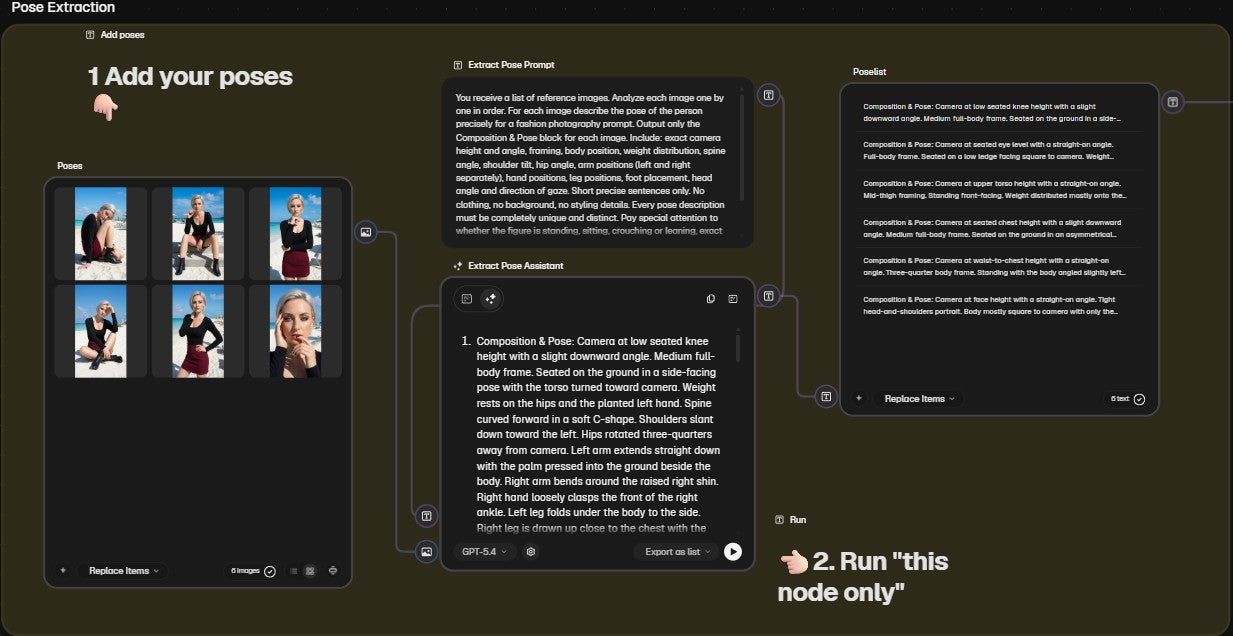
Schritt 1: Posen hinzufügen
Lade deine Ausgangsbilder als Referenz hoch. Der Workflow analysiert jedes Bild einzeln und beschreibt die Pose präzise als Prompt-Block, bereit für die Bildgenerierung.
Extrakt Prompt:
"You receive a list of reference images. Analyze each image one by one in order. For each image describe the pose of the person precisely for a fashion photography prompt. Output only the Composition & Pose block for each image. Include: exact camera height and angle, framing, body position, weight distribution, spine angle, shoulder tilt, hip angle, arm positions (left and right separately), hand positions, leg positions, foot placement, head angle and direction of gaze. Short precise sentences only. No clothing, no background, no styling details. Every pose description must be completely unique and distinct. Pay special attention to whether the figure is standing, sitting, crouching or leaning, exact camera distance and framing, and whether it is a full body, half body or tight portrait shot. Do not generalize. Output each pose description separately in the same order as the input images."
Schritt 2: Workflow starten
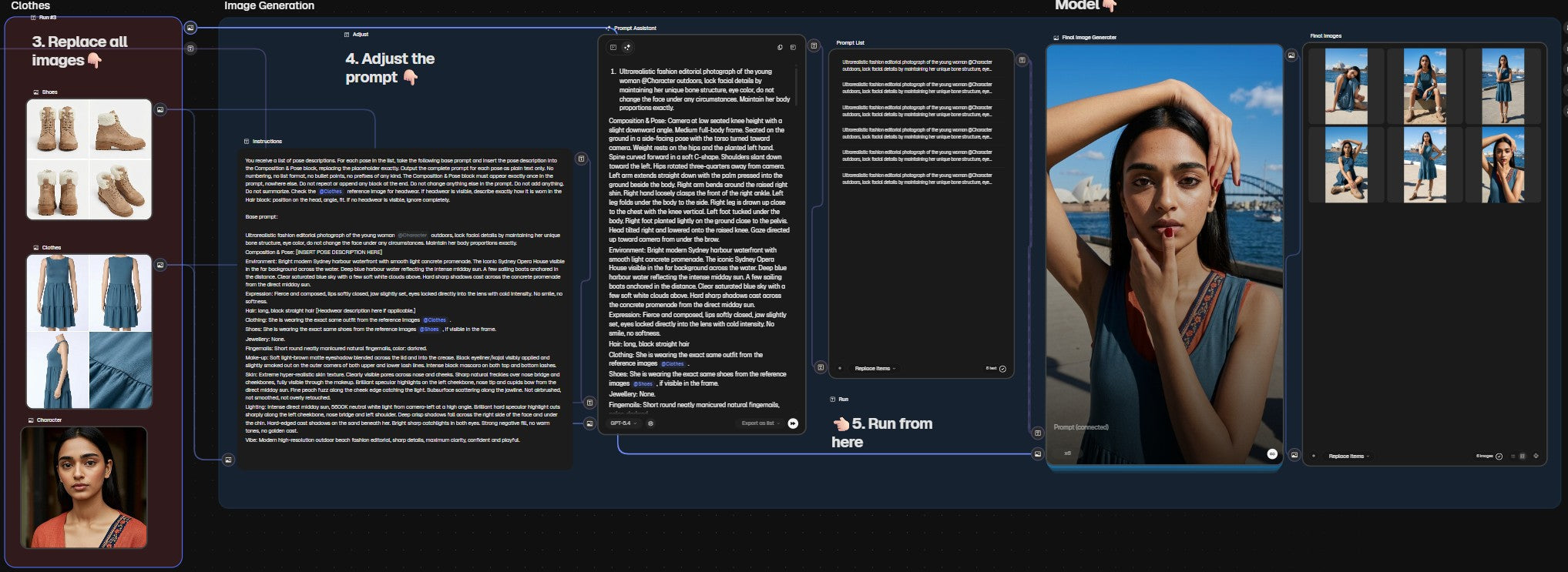
Ersetze die Referenzbilder mit deinen eigenen Posen, passe den Base Prompt an deinen Charakter an und starte die Generierung. Der Workflow baut für jede Pose automatisch einen vollständigen Prompt und generiert die Bilder in einem Durchlauf.
Assistant Prompt:
"You receive a list of pose descriptions. For each pose in the list, take the following base prompt and insert the pose description into the Composition & Pose block, replacing the placeholder exactly. Output the complete prompt for each pose as plain text only. No numbering, no list format, no bullet points, no prefixes of any kind. The Composition & Pose block must appear exactly once in the prompt, nowhere else. Do not repeat or append any block at the end. Do not change anything else in the prompt. Do not add anything. Do not summarize. Check the @Clothes reference image for headwear. If headwear is visible, describe exactly how it is worn in the Hair block: position on the head, angle, fit. If no headwear is visible, ignore completely. [Enter Base prompt:]"
Prompts funktionieren selten auf Anhieb perfekt. Manchmal braucht es ein paar Versuche bis das Ergebnis sitzt. Das ist völlig normal und gehört zum Prozess dazu.
So bekommst du den fertigen Workflow
-

Magnific
Account erstellenMelde dich zuerst bei Magnific an.
Magnific Spaces funktioniert nur mit einem bezahlten Plan, den du bereits ab 8 € im Monat bekommst. Erstelle dir über den Link deinen Account. -

Zum Workflow wechseln
Zum WorkflowKlick einfach auf den Button um meinen fertigen Basis-Workflow direkt in deinen Magnific Account zu kopieren. Bild hochladen, Workflow kopieren, ausprobieren.
-

Tools die ich täglich nutze
Zu meinen ToolsAlle Tools und Apps die in meinem Workflow nicht fehlen dürfen, von KI Bildgenerierung bis Content Planung.


Keine Lust auf KI-Experimente?
Kein Problem!
Überlass die Arbeit einfach mir. Egal ob High End Visuals, cineastische Videos, KI generierter UGC oder komplette Kampagnen, ich setze deine Vision maßgeschneidert und in Studioqualität um. Schreib mir einfach und wir besprechen dein Projekt!