


3 Examples from the Workflow
-

The Statement Sit
Copy PromptComposition & Pose: Full-body seated portrait. Camera at stair level with a slight upward angle. Framing wide enough to include the entire seated figure. Sitting on steps with legs spread in a grounded stance. Weight anchored on the seat with a slight lean forward. Spine curved forward subtly from the hips. Left shoulder dropped lower than the right. Hips squared to camera. Left arm bends upward with the elbow resting near the left knee. Left hand lifts near the mouth holding an object loosely. Right arm hangs down between the legs. Right hand rests near the inner right knee with fingers relaxed. Left leg bent wide with the foot planted on a lower step. Right leg bent wide with the foot planted and turned outward. Feet set far apart for a low triangular base. Head angled slightly down and to the right. Gaze directed toward the camera from under the brow.
-

The Intimate Close-Up
Copy PromptComposition & Pose: Extreme close-up portrait. Camera at eye height and straight-on. Tight framing cropped around forehead, chin, and both hands. Body position not visible beyond the neck. Spine and weight distribution not visible. Shoulders mostly out of frame and unreadable. Hips, legs, and feet not visible. Left arm raised beside the face. Left hand touches the left temple and cheek with fingers splayed. Right arm raised in front of the lower face. Right hand hovers at the mouth with the index finger touching the lower lip. Head remains nearly frontal with a faint tilt to the right. Gaze locked directly into the lens.
-

The Laid-Back Edit
Copy PromptComposition & Pose: Seated full-body portrait in a compact pose. Camera at knee height with a slight downward angle. Framing tight around the curled figure. Sitting on the floor with both legs folded close to the torso. Weight supported on the seat and the right hand. Spine rounded forward into a protective curve. Left shoulder pushed forward and upward. Right shoulder lowered by the supporting arm. Hips tucked under in a compressed seated position. Left arm wraps inward and is mostly hidden behind the raised knee. Left hand not clearly visible. Right arm extends down to the floor. Right hand is planted flat beside the body for support. Left leg bends sharply upward with the knee raised near the chest. Right leg folds under and across beneath the left. Feet pointed softly and tucked near the body. Head tilted down and resting against the raised left knee. Gaze lifted sideways toward the camera.


How the Workflow Works
This workflow is built for Magnific Spaces. Using a different tool? The prompts and the logic behind them work just the same in any other workflow tool.
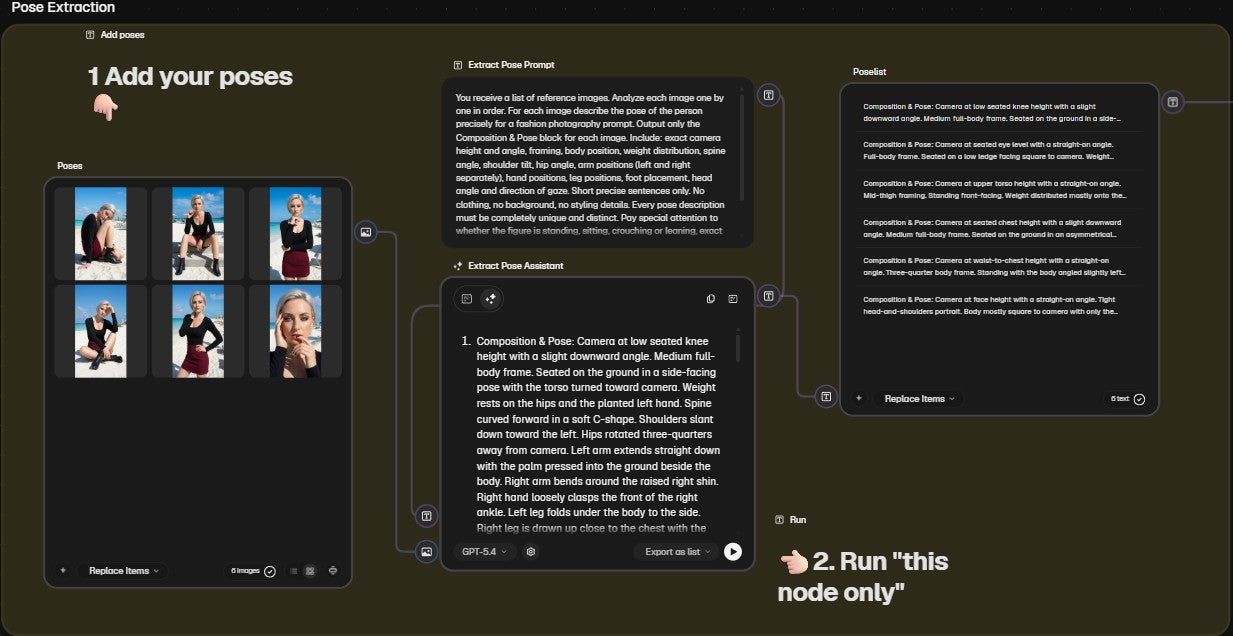
Step 1: Add your poses
Upload your reference images. The workflow analyses each image individually and describes the pose precisely as a prompt block, ready for image generation.
Extract Prompt:
"You receive a list of reference images. Analyze each image one by one in order. For each image describe the pose of the person precisely for a fashion photography prompt. Output only the Composition & Pose block for each image. Include: exact camera height and angle, framing, body position, weight distribution, spine angle, shoulder tilt, hip angle, arm positions (left and right separately), hand positions, leg positions, foot placement, head angle and direction of gaze. Short precise sentences only. No clothing, no background, no styling details. Every pose description must be completely unique and distinct. Pay special attention to whether the figure is standing, sitting, crouching or leaning, exact camera distance and framing, and whether it is a full body, half body or tight portrait shot. Do not generalize. Output each pose description separately in the same order as the input images."
Step 2: Start the workflow
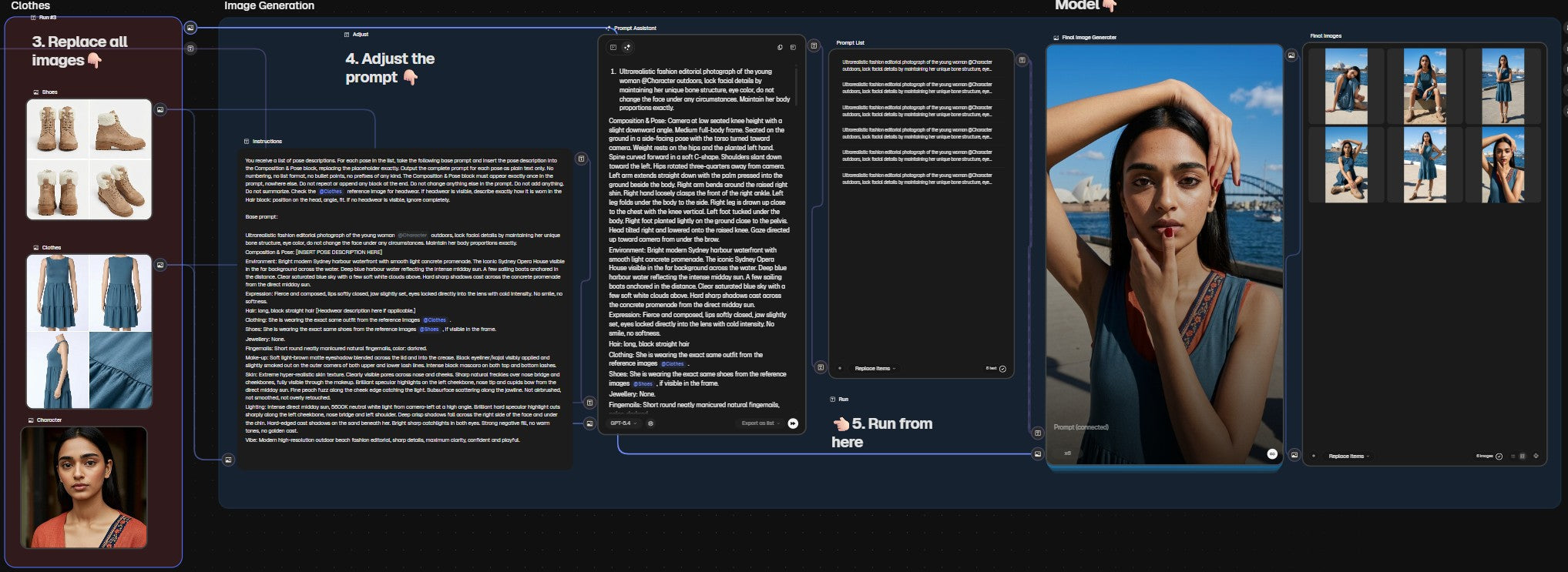
Replace the reference images with your own poses, adjust the base prompt to your character and start the generation. The workflow automatically builds a complete prompt for each pose and generates all images in one run.
Assistant Prompt:
"You receive a list of pose descriptions. For each pose in the list, take the following base prompt and insert the pose description into the Composition & Pose block, replacing the placeholder exactly. Output the complete prompt for each pose as plain text only. No numbering, no list format, no bullet points, no prefixes of any kind. The Composition & Pose block must appear exactly once in the prompt, nowhere else. Do not repeat or append any block at the end. Do not change anything else in the prompt. Do not add anything. Do not summarize. Check the @Clothes reference image for headwear. If headwear is visible, describe exactly how it is worn in the Hair block: position on the head, angle, fit. If no headwear is visible, ignore completely. [Enter Base prompt:]"
Prompts rarely work perfectly on the first try. Sometimes it takes a few attempts to get the result right. That is completely normal and part of the process.
How to get the workflow
-

Magnific
Create accountSign up for Magnific first.
Magnific Spaces requires a paid plan, starting at 8 € per month. Create your account via the link below. -

Switch to the workflow
To the workflowClick the button to copy my ready-made base workflow directly into your Magnific account. Upload your image, copy the workflow, start creating.
-

Tools I use every day
My ToolsAll the tools and apps that are essential to my workflow, from AI image generation to content planning.


Not in the mood to figure out AI yourself?
No problem!
Leave the work to me. Whether you need high end visuals, cinematic videos, AI generated UGC, or complete campaigns, I will bring your vision to life with custom, studio quality results. Just reach out, and let's discuss your project!